
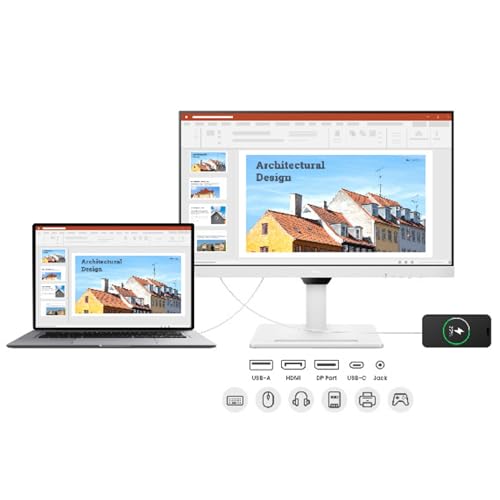
BenQ GW2790QT 27″ IPS 2k QHD Monitor| USB-C (65W PD)| Coding Mode| 99%sRGB|Daisy Chain| Height Adjust| 75Hz| Eye Safe Certified| Brightness…
₹24,990.00
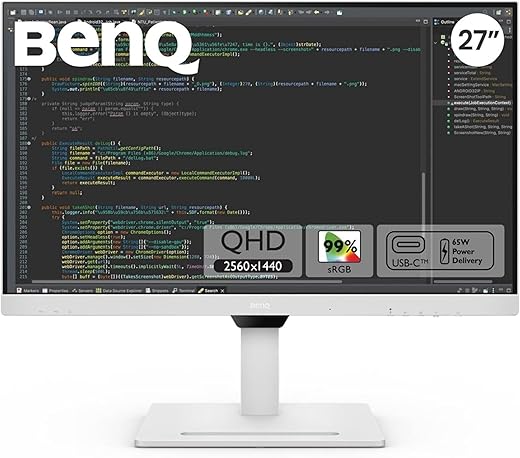
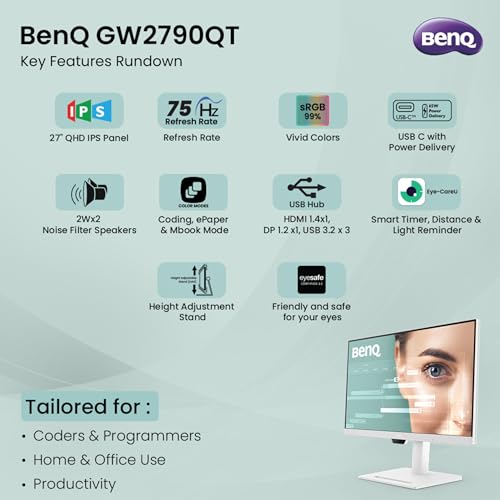
- Display: 27” Quad HD 75Hz Ultra-Slim IPS Monitor with 2560 x 1440 resolution, 350nits brightness
- Aspect Ratio: 16:9 |Viewing Angle (L/R) (CR>=10) 178°/178°
- Eye Care: Anti-Glare, Proprietary Brightness Intelligence Plus, Low Blue Light Plus, flicker-free technology, e-Paper Mode.
- Daisy Chain: Connects multiple monitors with single display out from the source using Daisy Chain setup for a decluttered workspace
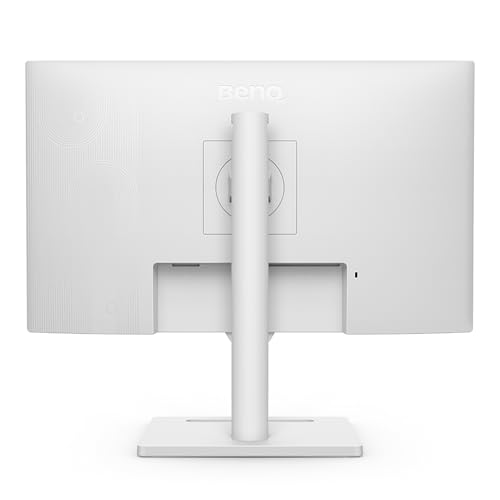
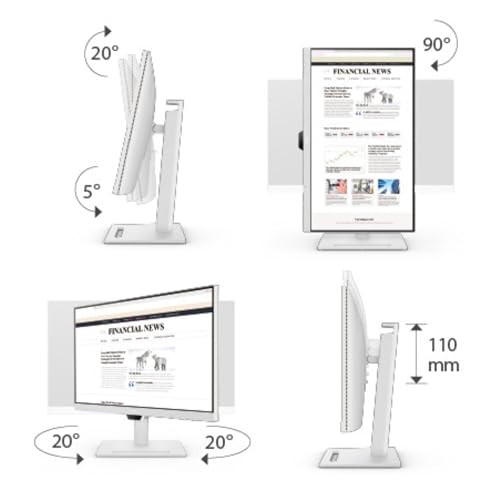
- ERGONOMICS W/ HEIGHT ADJUSTMENT: allow easy customization for flexible working and create seamless multi-monitor setups with daisy chain
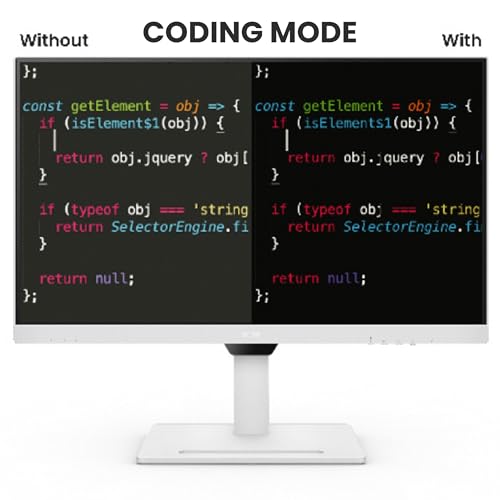
- Coding Mode: Specially tuned mode for coding, making the colors pop and improving the contrast and black levels for better coding/programming experience with long term comfort
- Noise Cancellation Microphone: Integrated noise cancelling microphone filters ambient sound, bringing out important vocal cues with clarity during vocal communication.
- Noise Filter Speakers: 2W x 2
- In the Box: 16A Power Cable, HDMI(v1.4) Cable, USB C Cable, Warranty Card, Safety Instructions, QSG
,
Specification: BenQ GW2790QT 27″ IPS 2k QHD Monitor| USB-C (65W PD)| Coding Mode| 99%sRGB|Daisy Chain| Height Adjust| 75Hz| Eye Safe Certified| Brightness…
|
13 reviews for BenQ GW2790QT 27″ IPS 2k QHD Monitor| USB-C (65W PD)| Coding Mode| 99%sRGB|Daisy Chain| Height Adjust| 75Hz| Eye Safe Certified| Brightness…
Show all
Most Helpful
Highest Rating
Lowest Rating
Add a review
Related Products



BenQ GW2790QT 27″ IPS 2k QHD Monitor| USB-C (65W PD)| Coding Mode| 99%sRGB|Daisy Chain| Height Adjust| 75Hz| Eye Safe Certified| Brightness…
₹24,990.00

gagan kishore –
Me gusta mucho este monitor
La base es robusta de hecho pesa mucho pero le da estabilidad muy buena, no se mueve.
Los colores son muy buenos ya que resalta el texto y en videos de internet corre muy bien.
Para programar tiene las condiciones exactas para colores o girarlo en forma vertical
En color blanco es genial
Sus modos de configuración son fáciles y tiene protección ocular
Cansa menos la vista y para documentos es buenisimo también ya que tiene modo para no notar tanto el blanco del documento y protección ocular.
Para su precio creo que lo vale
Al menos para programar es muy bueno.
Le doy cinco estrellas por su precio y colores que maneja.
Mukund –
I’m a full time software developer. I was using a 25″ 1440p Dell (nice, but discontinued) and needed to get a second monitor for another location.
I initially picked 25″ over 27″ on purpose, having read Nick Janetakis’s article on the ideal screen size for developers (long, but worth a read). I find text on a 24″ to be just as legible as my 16:9 25″, but appreciate the extra height of 16:10. I also prefer the colours and contrast on the BenQ, and its ability to adjust itself to the ambient lighting conditions is superb.
So in all respects, I prefer this BenQ to my Dell. I’m still using the Dell, but on a different desk. No need to buy stuff we don’t need, right?
I was also 28″ curious, and did try the 28″ version. It’s got a very nice image, but (as a tiling window manager user) I found that I was turning my head left and right a lot, and rarely looking at things in front of me. It’s tall too, so a lot of stuff I’d need to read would be near desk level, which has a fairly negative impact on my posture.
Conclusion: I’m far better off when my windows (which fill my screen) are on a display whose edges aren’t so difficult for me to see.
This is also why I prefer a single screen. I usually put code on one workspace, documentation on another, and switch between them with a keystroke more quickly than I could turn my head to look at another screen. Occasionally I need docs and code side by side, in which case I’ll put a browser next to my editor. That works great too. Often I’m working on an app, and will put the app’s UI next to the editor so I can see the impact of my changes in real time. Also great. And if I need to see two different files, they’re visible side by side in a full screen editor.
End result: I’m pretty confident I’ve got the best monitor on the market for tiling window manager users who don’t want to be turning their head a lot, looking up/down too much, etc.
Also, on looking up/down, beware a monitor that’s so tall that you need to read things above eye level. It requires your eye to be wider open than normal, which increases the rate at which the lens dries out. Combined with our tendency not to blink when looking at a screen, this can increase your chances of getting dry eye disease. I’m now an eye drop user, and I think it’s because I used to position a monitor a bit high. So that’s another reason not to get a bigger one.
Faisal Siddique –
I recently purchased the BenQ GW2790QT 27″ IPS 2K QHD Monitor for use with my MacBook, and I am extremely satisfied with my choice. The USB-C with 65W Power Delivery makes connecting and charging my MacBook seamless, reducing cable clutter on my desk.
Overall, this monitor is a perfect fit for MacBook users, combining excellent performance, build quality, and thoughtful features. Highly recommend it for professionals and students alike!
Amazon Customer –
Writing this review after 2 weeks of use, product quality is very nice and had a great experience in programming with this monitor ,it do support coding mode by which the display automatically change it’s colour as so that the colour of code would be more visible and background turns dark to work for longer hours. Not just coding mode there are so many other modes also such as eye care mode, gaming mode, Reading mode and my one i like the most Epaper mode.
Sitting for 5-6 hours daily with macbook screen and sitting with this monitor has a difference , now i don’t feel eye stress and i don’t have to close my eyes after every 15 mins for rest. the difference is surely visible so in terms of eye care it is the best monitor i have seen till now. Go for it if looking for eye protection monitor.
There is only one issue that i faced with this monitor was the speaker quality was not that good ,volume of this monitor is very low and in my case while i am sitting very close to the monitor but still i could not hear the sound so i need to put on my earbuds , this is the main reason of giving it 4 stars .
Mukund –
E’ un ottimo monitor, i caratteri molto chiari e ben definiti.
Il problema e’ che il formato a 28 pollici è quadrato , 3 :2.
Sembra i vecchi monitor che c’erano tanti anni fa.
Per il coding. ci vorrebbe un monitor più largo che consentisse di scrivere una riga di codice molto lunga.
Per questo l’ho restituto e mi è un po’ dispiaciuto perchè comunque è un monitor valido
YUVRAJ YADAV –
It’s color modes are super cool and relaxive for eyes. Also it’s comes Coding Mode Dark and light, Cinema, epaper, sRGB and Custom mode.
Codes on this monitor is super easy to read and it’s Cutts most of the glares because it’s have anti-reflective mate coating.
Benqs app Display pilot 2 is a awesome application to control the monitor as well as adds more features through the app
If you are a software developer you should definitely try this monitor.
Also comes with of 3 USB port .
Only downside is speakers in the monitor is not that loud.
gagan kishore –
I Love the monitor. It works very well! Love when it can rotate 90 degrees.
Faisal Siddique –
What I like
1. Affordable
2. USB C, it charges the device connected via USB C which is very handy.
3. Good screen quality
4. Works with Apple M2 Pro
5. Height adjustable, tilt and swivel adjustments
6. Brightness sensor which automatically sets the brightness as per outside light
7. Has decent quality built-in speakers
8. Metal stand which is very sturdy
What I don’t like
1. The adaptor which connects it to power supply.
Shopaholic –
I find the coding mode very helpful as it reduces eye strain. The color accuracy is excellent, and the screen size is highly convenient. It allows me to efficiently use 2-3 windows simultaneously—one for VS Code, another for displaying results, and a third for browsing. Value for money.
Ahammed Rahees AT –
Was searching for perfect monitor from long time. Got it in flash sale for 22.5k luckily in May 2023.
Features
1. 2 usb type C ports (1 downstream, 1 upstream) : just 1 wire for charging and display, very clean. With another type C, Connect phone or any device and get access to it.
2. 3 usb type A ports
3. Daisy chaining (I am using it to connect one more monitor)
4. Auto brightness
5. Different modes and best part is when you modify each mode like brightness, blue light, volume, auto brightness etc it stays with that mode only, you can change mode and whole settings will change accordingly what you have saved in different mode, one time effort but very very useful
6. Flat base, very nice can be use to place things.
7. 2k screen feels good
8. Very good blue light filter for long sittings
9. Ergo stand
10. Joystick to control settings.
11. Looks premium white monitor, edges are small, no hassle, easy to use.
12. Built in mic with Noise cancellation and on/off switch. Not that useful as its 27 inch screen so u will place it a bit far.
Cons
1. Speaker of no use.
2. 16 Amp power plug (use adapter or old monitor 10amp wire)
3. No dp cable (need to buy 300 rs from outside)
4. Benq display software (needs to download from website) doesn’t support any feature like screen split etc in this desktop. Only support rotation.
Ahammed Rahees AT –
Product wise is good , Speakers quality is very poor comparing with other BenQ Monitors. Height adjustable and tilt as well. Power cord is 16Amp to be noted and need to buy another extra power Socket Board to plug cable.
Amazon Customer –
Similar functionalities available in other products with less price than this. Present itself as lot of functionality hence the hefty price. But functionality available is not justifying the price.
Shailaja –
Great monitor with great features for programming but very thick with bad port placement.. Most amazed with this nano-texture coating which totally removes glare and makes it usable even on direct sun, compared to previous Dell U2723QE which was anti-glare but was terrible. Quality of picture is great, and I truly love Moon Halo, especially at night. Stand is beautifully made but very very heavy – can barely move it on the table.
At the negative side, I would like better that more USB ports were put at the back side and less on bottom side. Also, this monitor is very thick, which made my Light bar placement pretty hard – had to create custom solution to make it fit. Function bar is useless to me as I use Display Pilot 2 to control the monitor, so that is pretty much just an advertisement trick.