



PiBOX India Raspberry Pi 4 Case with Fan Dual Speed 2GB, 4GB, 8GB Black, with air Vents, with High and Low Speed Option Fan Modular Design, Pi 4B,…
₹424.00
- 【Raspberry Pi 4 Case with FAN 1Gb 2GB 4GB Black】Compatible with Pi 4 1GB, 2GB and 4GB – With unique removable top cover design, it can also be access to GPIO port, Chipset, Heatsink, camera slot and display slot
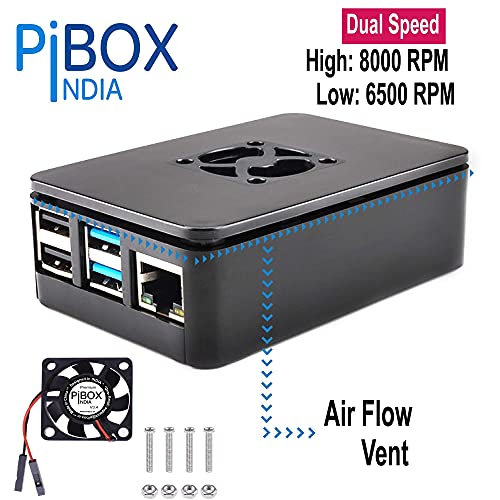
- 【PiBOX India FAN – Dual SPEED 】Fan supports Dual speed – High and Medium speed by connecting to the corresponding GPIO pins. Connect 4(Red) 6 (Black) – for High Speed: 8000 RPM and Connect 6 (Black) & 1 (Red) – for Low Speed 6500 RPM.
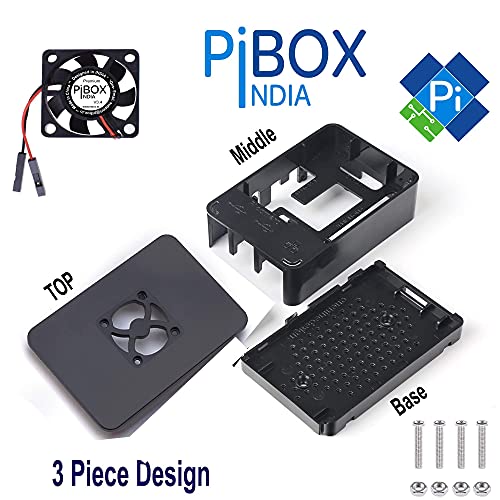
- 【Easy Install with 3 Piece Design】Easy access to all ports and slots of the Pi.Heat sink openings for both CPU and LAN chip. Heat Vents with on bottom with Rubber feet. It’s easy to install; The case consists of three parts and there is no need to screw the case, just cover them tightly;
- 【Excellent warranty】Raspberry PI 4 case powered by PiBOX India comes with 12 Months Manufacturer warranty as well as friendly email support. Refer: Product Manual, Break your PI BOOK (Hard copy included) on the Amazon listing & Product Packaging (Attached on the listing below also). REFER INSTALLATION INSTRUCTIONS DOCUMENT ON PRODUCT DESCRIPTION and on DOCUMENTS.
,
Specification: PiBOX India Raspberry Pi 4 Case with Fan Dual Speed 2GB, 4GB, 8GB Black, with air Vents, with High and Low Speed Option Fan Modular Design, Pi 4B,…
|
8 reviews for PiBOX India Raspberry Pi 4 Case with Fan Dual Speed 2GB, 4GB, 8GB Black, with air Vents, with High and Low Speed Option Fan Modular Design, Pi 4B,…
Show all
Most Helpful
Highest Rating
Lowest Rating
Add a review
Related Products


PiBOX India Raspberry Pi 4 Case with Fan Dual Speed 2GB, 4GB, 8GB Black, with air Vents, with High and Low Speed Option Fan Modular Design, Pi 4B,…
₹424.00

Amazon Customer –
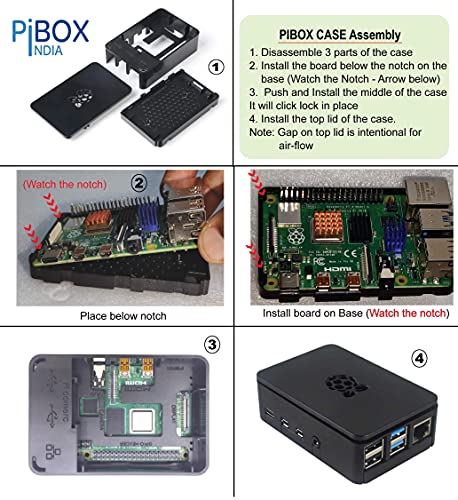
PiBOX India Raspberry Pi 4 Case with Dual Speed is almost the same size as the Pi board. It consists of 3 pieces, the overall shell which holds the Pi board, the top cover on which the fan is attached and the bottom cover plate. Looks like its made of brittle plastic, so I took my time to unassemble it. There are no screws to hold the case parts together. The top plate had some clips built into it and clips on to the middle part. You will have to push the bottom part into the position. I placed the Pi board in its position since no screws nor clips were given to attach it. The fan was packed separately with 4 screws and nuts. The instructions for attaching the fan and GPIO pins are available on pibox.in website.
After assembling the case & Pi board, I ran the Pi without the top case and fan for 2 hours, with nothing but Raspian GUI. The average temperature was 58 C, once reaching 60 C. Then, I attached the fan to GPIO 3.3V (Slow speed mode) and close the top case. Now, with the fan running, the GPU and CPU show 45 C. Highest was 46 C and the lowest was 44 C.
Summary: Somewhat overpriced; PLastic material brittle, I doubt if it will last long; Dicey way of holding all these together; No heatsink; but good cooling, drop of maximum 10 C, with fan running at slow speed.
Note: Tests without heatsink.
Siva –
Took 10 mins to install. Works as advertised. Reduce the CPU temperature from 55C to 45C.
Nastanir🌳 –
Very good case for my raspberry pi, fits perfectly and works well, fan is very easy to install as well.
Amazon Customer –
I like the design & sturdiness of the Box , Plastic Quality is Ok.
Didn’t like the Fan as it makes more noise compare to cooling it provides. I Had to additional fan out at the back to bring the temperature of raspberry pi under 45° room temp being 28-29°. This box along with Fan helps to cool the system down by 7-8°.
18-Aug-2021.
As I mentioned the Fan is of low quality and it died out within 45 days.
Jack –
The design and build quality is astonishing. Three piece design. Do not make the mistake of placing the board on the middle piece. Follow the steps
1. Separate the three pieces
2. Place the board on the bottom most piece ( observe two notches which hold the board )
3. Place the middle board
4. Add the fan( the logo facing towards the board) as described in the pic provided on the amazon site
5. Vola you have a fan case with you
For more help go to pibox.in
POPO –
[Updated Review on 2023]
Since I purchased this 3 years ago, this case is still working great and very easy to handle and protect the Pi. We can easily remove top for mounting any other things like camera, and put it back with ease.
Since raspberry OS now supports easy fan on-off though its own OS settings, we can make this fan On at particular temperature. So generally I set it to 65 or 70 and it cools it down to 50 in 10-20 seconds and then automatically fan goes off. Earlier I had to do write a python program and install resistance and transistor to on-off the fan. But now its EZ PZ.
Overall this is great product. Trust me I have seen cases worth 1500 and 7000 rupees too. They do the same job but this is much much cheaper and better.
Purchase it and you will love it.
Advice:
– Purchase 5v fan separately if you want but current 3.3v is also fine.
– Do buy CPU, RAM and GPU Metallic Heatsinks (it is generally Rs. 200 ) from same manufacture PiBox, and install it on Pi’s CPU, RAM and GPU unit. The cooling happens so fast and also increases passive cooling.
[Old Review from 2020]
Pros:
– Great design and great detailing on box.
– Fan works silently and perfectly.
– Slots given on box is so good.
Cons:
– There’s no visibility of raspberry pi ON OFF status as box blocks the status light inside the body.
POPO –
With this fan and case compared to the og one, it simply drops down from 80° to 50°. Idle is around 46° for 4B. Good enough.
Nastanir🌳 –
With my heatsink, a piece of thick (3mm) aluminium sheet and a ceramic heat radiator, the fan at 3.3 V kept the temperature below 55 even when CPU runs at 80-90%. At 3.3 V fan noise is very low. I could have cooled further using the 5V for fan but at that voltage fan is noisy. It is a fine case. It is very practical as weight is almost nothing compared to heavy metal cases that I was using before. After using for a week, running 24×7, the fan noise become quite audible even at 3.3 V. As it is a two pin fan without any control, there is no way to give it a rest. Fan quality is not suitable for continuous operation without noise. Update: Changed the fan to the official fan with control. Now better.