
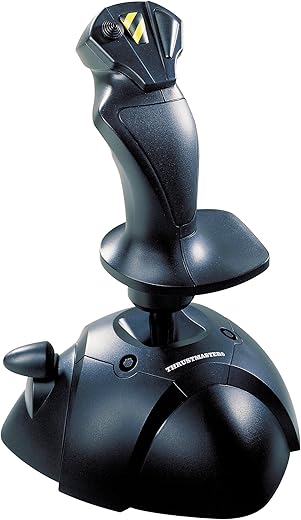
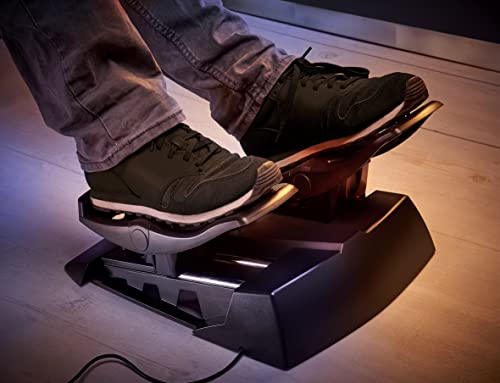

Thrustmaster USB Joystick | Flight Game Controller | Joystick |PC
₹9,675.00
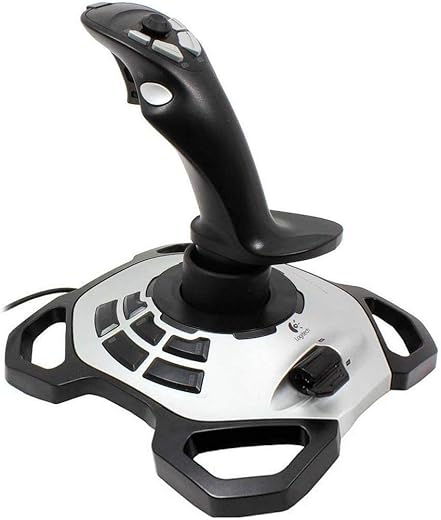
- Weighted base, with non-slip rubber pads for perfect stability
- The point-of-view button offers easy camera control and perfect immersion in games
- To know the procedure to claim warranty, please refer “Technical Specification”
- Ergonomic handle with enlarged rest for optimal gaming comfort
- 3 axis and 4 buttons plus 1 trigger for complete control
- 3 axis and 4 buttons plus 1 trigger for complete control
,
13 reviews for Thrustmaster USB Joystick | Flight Game Controller | Joystick |PC
Show all
Most Helpful
Highest Rating
Lowest Rating

![QIWA Mobile Game Controller for PUBG Mobile Controller L1R1 Mobile Game Trigger Joystick Gamepad Compatible with iOS & Android Phone [video game]](https://m.media-amazon.com/images/I/41A7mTvHfoL._SX342_.jpg)

Fernanda –
Parfait article et vendeur au top !!! Je recommande
swamy o swamy –
For the price it’s good
Mine broke after a month
I contacted them for warranty
It didn’t help they are asking me to contact thrustmaster and they are asking me to talk with seller
Aftab S. –
A very good product – absutely worth the price. Bought this to play FSX and performing briliiantly. The axis and setups are very easy and configure with the plug-and-play option.
The joystick has a nice tilt and rotation axis with a nice spring to keep it easy. Also compatible with other aerial games such as DCS and War Thunder. The buttons are easily accessible and provide a good grip. As an entry level joystick, provides full value for money and enjoyment.
Kindle Customer –
Bought this joystick specifically for playing Microsoft Flight Simulator 2020. It wasn’t my first choice by any means but at the time of writing this every other joystick, yoke, throttle control has been sold out or is selling for vastly inflated prices due to such low stock. This joystick was pretty much what was left and also one of the cheapest (I bought for £30) so wasn’t expecting much to be honest but thought it “might” be better than a keyboard and mouse at least.
Anyway, pleasantly surprised. Took me a while to get it to work with MSFS but this is more down to MSFS I would say. Firstly, it doesn’t recognise this joystick specifically and just shows up as “USB Game Controller” however you can still map functions to the joystick. Next issue was I had mapped Ailerons & Elevator left, right, up, down to the joystick (seemed sensible to do it this way) and no matter how sensitive I was with the joystick my plane would not react and then suddenly react violently and ultimately crash within seconds. Playing about with the sensitivity settings made no difference. Finally figured out I need to map to the Ailerons Axis and Elevator Axis instead! This appears to have caught out quite a few people in the MSFS community and I wonder how many joysticks have been returned because of this. Once I got past this problem then the joystick works like a dream. You can also further adjust the sensitivity within the software itself.
I have also been able to map the drone camera functions, pause key and brakes to the buttons as well as throttle to slider control to keep keyboard input to a minimum.
Finally, like the look, feel and size of the joystick. It’s all black except for middle button (a touch of yellow) so matches my black keyboard, mouse, monitors. It doesn’t come with any suction pads or means of fixing it to the table so I’m not sure how well this would work with more arcade like games. In the simulator I am only applying gentle movements to the stick.
I’ve read reviews of longevity issues so will update if I encounter these. At the moment very pleased with the purchase. PS I appreciate this review is more how this joystick works with MSFS rather than the joystick itself but giving the popularity of the game right now I’m guessing I’m not the only one who considered buying the joystick for this reason
sb_apache –
This joystick worked beautiful, no problems at all. Used with MS 2004 to fly the Boeing and Airbus, initially it was jerky and then used it on a laptop with a faster processor and calibrated the joystick. After a few adjustments, it worked real good. The only reason for 4 stars is the placement of the throttle control which makes it difficult for left handed stick operation. The other issue is the number of buttons which are limited to program functions like landing gear, flaps etc. BUT moving your hands to do other things helps in improving your scan, kind of using purposeful distractions and keeping the airplane where it should be. Plan on buying another one.
Indranil Kar –
Very good beginner joystick for flight simulation, especially for larger airliners, preferably airbus, like an A320, A330. I mainly use this for Flight Simulator 2020. I custom mapped my controls as I have some custom combinations (YES, WE CAN MAKE CUSTOM TRIGGERS USING COMBINATION OF BUTTONS)
Truly plug n play! No driver installation whatsoever separately.
Used this for over 15 long haul flights on an A320 and A330, with 2 short island hops in a Cessna Citation CJ4. There are 7 buttons that are custom mappable for special functions. (1 button has 4 diff controls itself) and there is the side stick and throttle. Both are quite good and usable.
It will take time for you to get used to sensitivity but it’s quite decent. Overall, a good starting HOTAS for beginners. I bought this at 1,893 INR. Great pricing, nothing is even close to this!
Plastic but feels built to last! RECOMMENDED FOR BEGINNERS and even those who want a cheap flight joystick!
Connects via USB-A
Usable for
DCS World, X-Plane 11, MSFS 2020
Fernanda –
tras comprarlo y probarlo con mis juego de simulador de vuelo estaba muy satisfecho.. pero al dejarlo conectado a la compu me empezo a dar drift un control logitech… tras investigar un poco en un foro me encontre que el joystick manda señal continuamente a la computadora e interfiere con otros controles. asi que si no lo voy a usar lo tengo que desconectar o afecta los otros controles que esten conectados.
Amazon Customer –
Muito bom, bonito e barato! Excelente compra… Jogo DCS nele e funciona muito bem!
ARNAV KISHOR AHER –
1. Packaging was amazing. It was really fun to unbox this thing.
2. The joysticks main axis itself is wonderful considering the price, there are litrally no dead zones and it responds all the way through.
3. The throttle axis was a bit jagged at start but after calibrating it, worked well.
4. The joystick only has 4 buttons and a hat switch. The immersion is ruined by a bit
5. Anyone trying to make their flight simulator experience perfect for cheap, I would recommend building a throttle quadrant at home.
6. It is plasticky and the buttons rattle a bit but it’s wonderful considering what you pay.
7. Its a plug and play joystick, so anyone using something like MSFS2020 will have to manually configure the joystick which is a big bum.
Conclusion~
If you’re someone new to flight simming then this is the best one for you.
If you’re trying to get better and step up your flight sim experience, it’ll be too cheap for your experience.
Karthik –
Perfect for my application. I’m not a gamer, but I like my flight simulator. I wanted a simple usb joystick with a few buttons but not a full flight yoke. This fit the bill. Plugged in and worked with no additional configuration or calibration required.
Atanu Bhattacharjee –
Works will with Hawx and other Ariel games… Perfect gift for my son…
Nishit M –
This is my first joystick. The only expectations that I had from my joystick was that I could provide continuous inputs instead of digital inputs (keyboard). The box has the joystick and the manual, and nothing else (Didn’t expect any extras at the price point).
FS2020 detected the joystick, but did not assign any controls to it. I did not do much digging to find out why, but instead mapped the controls manually.
The pitch and roll axis are the joystick y and x axes respectively. I didn’t need yaw, and there isn’t another axis on this joystick (unless you replace the PoV buttons), so I ignored this. Mapped the throttle axis to the thumb throttle (this is possibly the single most important contributor to better speed control and landings), and landing gear toggle, flaps, parking brakes to other buttons apart from cockpit strafe left,right,up and down to the PoV buttons.
I’m running this on default sensitivity, and right off the bat, my landings became butter smooth.
In terms of ease of use and ergonomics, the joystick is brilliant and feels more expensive than it actually is. The shape and handrest are perfect for me. That might not be the case if you are left handed.
The cable is sufficiently long.
The one issue that I had with FS2020 is the lack of more buttons on the joystick for other common functions, and I had to occasionally switch back to my keyboard. Although, to be honest, FS2020 has way too many control mappings to be mapped on a joystick.
I highly recommend this joystick if you are on a budget, and still want a well built and functional joystick.
ARNAV KISHOR AHER –
The product has a huge deadzone thats ruins the realism of the game. When i provide any input in the X or Y axis, the max input limit is only 75% to 50% of the actual physical limits of the hotas. It makes it so that if you turn the hotas by a small amount, the plane turns by a lot. I have tried every single calibration known to man and still failed to get the extra unused deadzone. Please do not buy this product, instead save up some money and buy a better one.