
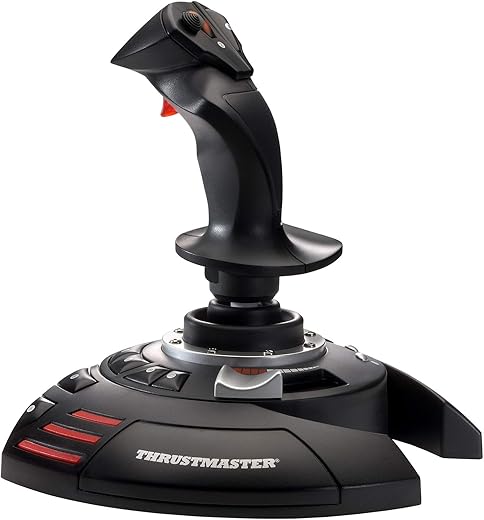


Thrustmaster T-Flight Stick X | Flight Game Controller | Joystick | PC/PS3
₹1,999.00
- Plug & Play for quick and easy installation with all of the preconfigured functions
- 12 action buttons and 4 programmable axes
- Large hand rest for optimal comfort
- Rudder driven by rotating handle, with integrated locking system
- Brake trigger (civil flight) or rapid-fire trigger (military flight)
- Multidirectional hat (panoramic view).Internal memory: you can save everything you’ve programmed, even when your joystick is unplugged
- Exclusive Mapping button: the various functions can be instantly moved around.
- Exclusive Preset button: to switch instantly from one configuration to the next
,
13 reviews for Thrustmaster T-Flight Stick X | Flight Game Controller | Joystick | PC/PS3
Show all
Most Helpful
Highest Rating
Lowest Rating
Add a review
Related Products



Thrustmaster T-Flight Stick X | Flight Game Controller | Joystick | PC/PS3
₹1,999.00

Erwin –
Según mi marido, que es quien lo usa, un buen producto, aún está probando configuraciones de él ya que son muchas y variadas. Contento con lo estable a la hora del manejo. El precio ha sido decisivo a la hora de comprarlo. Contentos, lo recomendamos.
dlaville –
La calidad es perfecta y da el ancho para juegos sencillos cómo ace combat o project wingman sin problema alguno.
vchan –
Product is good but the issue is if I connect this flight stick to my PS3, my PS3 remote doesn’t work at the same time. If I change settings, PS3 remote starts working but Flight stict doesn’t. The thing is everytime I have to change the setting time and again, that is why I am returning this item.
During online game no one has too much time to change the setting time and again.
Subhadip –
From a price to performance ratio pov this thing is probably the best… And many reviews already cover the important bits…
It is sturdy, heavy so doesn’t wobble around, size and gripwise perfect has all the buttons you need in the right places and practically zero learning curve…
2 small grouse…
1. Its not compatible with AC7 out of box!!! I mean seriously!! Thrustmaster has other more expensive ones ‘compatible’ with AC7 and no reason for this to not be on the list… I had to manually write a config in the AC7 files to make it work with the game and once that was done all was great!! But why would I need to write 10 line of codes and spend hours googling and racking my head on something as simple as that?
2. The second and even smaller issue in general is the speed control slider… I just wished it had a spring control to bring it back to ideal speed in game rather than manually swiping up and down… I understand this is realistic in a full blown HOTAS but still it’s just annoying leaving it in an accelerate position many times…. And in game finding that neutral zone is quite tricky….
Other than that… This is a great buy for the money!
Capt Rohit Das –
Works well. The previous joystick was logitech. This joystick is also very good and serves my purpose of playing flight simulator on pc.
AnonymousGadgetUser –
Best Joystick ! Works Best with FSX ! Simply Plug & Play !! 3 year warranty
Pavan A. –
got that to play fligh sims , fantastic joystick , there may be better ones around at this cost build is great , just snapped it on and started using it.
Sun –
I upgraded my computer to a gaming computer so I could run MSFS 2020. Let me also mention I am running Windows 11. I tried using my older MS Sidewinder Flight Stick with the game but for some reason the aircraft were uncontrollable. I switched to an older Logitech flight stick I also had and even that was unusable. In the course of trying to figure out why the MS flight stick wasn’t working it broke so I was forced to look for a new flight stick. I looked through all the flight sticks on Amazon and for some reason this one I seemed to like the most. I looked at reviews on the web and some people were saying this stick didn’t work with Steam games and others were saying it didn’t work with Windows 11. However all the other reviews were very positive. I figured for $40 it was worth taking a chance, if it didn’t work at least I had a new flight stick I could use with MSFS X.
When the stick arrived I plugged it into the USB port and Windows 11 recognized it immediately. I launched MSFS 2020 and went to the control options and the stick was there and the buttons were already pre-programmed. MSFS gives you the option to change the button settings but I left them as they were, it just took me a while to get use to them since it was a change from my Sidewinder stick. The first takeoff I tried was perfect and I flew to another local airport and landed perfectly. The flight stick worked perfectly and flawlessly. There is also a knob on the bottom the stick you can use to adjust the tension to your liking. On my computer this stick is compatible with Windows11 and Steam.
The only con I have with this flight stick is the arrangement of the buttons. Some of them like the brake release, landing gear toggle and elevator trim kind of require an awkward reach to get to. While I can reassign them I like keeping them off the stick itself. I hope on the future Thrustmaster considers moving these buttons to a more ergonomic location on the base of the stick.
All in all I give this flight stick a 10/10 and is an excellent value for the money.
Placeholder –
I found this to be a good entry level joystick for PC flight simulator purposes. Comes pre programmed / mapped for basic simulation use . Very reasonably priced. Thrust master have made good progress with their gaming accessories.
Subhadip –
Thats why I call Amazon the Best seller all over the world. Excellent quality and control. Easiest of all joysticks to install. No drivers to install. Can play all games. But made for FSX. Loved it.
Little overpriced (Rs 3800)
Susana –
Works well with my Flight Simulator.
Carl Knight –
Très bon Joystick possèdent assez de bouton afin d’associer toutes les commandes basique de vol. Ergonomie excellente et qualité de finition très bonnes pour le prix. Meilleur rapport qualité prix que je connaisses.
r4g3z –
I bought this because the equivalent Logitech 3d Pro is not available in the market. Price has been increased. This unit seems to be better.