


Ant Esports GP310 Wireless Gamepad, Compatible for PC & Laptop (Windows 10/8 /7, Steam) / PS3 / Android
₹1,139.00
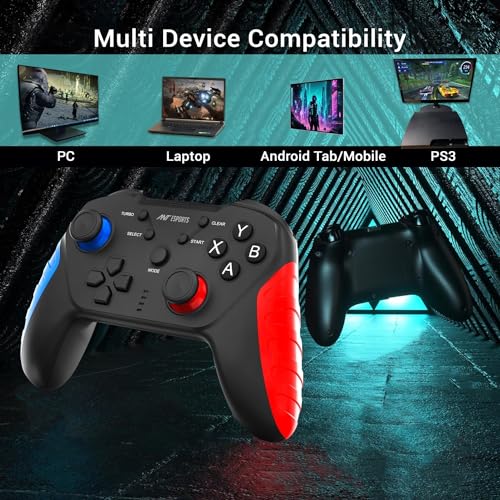
- Compatibility – PC / Laptop Computer(Windows 10/8/7/XP), Steam, Play Station 3(PS3), Android Mobile Phone*/Tablet*/the device needs support OTG function( * not all Android phones are supported, check your device before purchasing for Android devices, Limited games can play on it which are supported to android games)
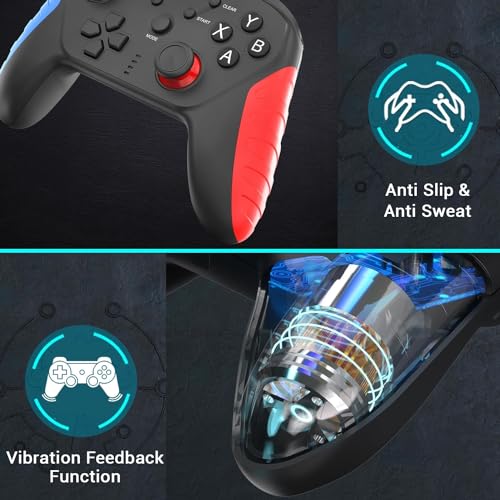
- Excellent Design – Equipped with 2.4Ghz wireless technology, supports up to 10m range | Wear-resistant Anti-slip Joystick | Cool Appearance | Comfortable Grip
- Plug & Play -Only for PC games supporting X input mode, Android mobile games supporting Android mode, Play Station 3. No need to install drivers except for Windows XP
- Feature – Multi-mode : X input, D input, Android, PS3 | Vibration Feedback Function
- Some games may need to set the buttons or use third-party software before use
- Need a OTG adapter or cable for the Android device with Type-C or Micro-USB port ( OTG* Adaptor comes inside the product)
,
8 reviews for Ant Esports GP310 Wireless Gamepad, Compatible for PC & Laptop (Windows 10/8 /7, Steam) / PS3 / Android
Show all
Most Helpful
Highest Rating
Lowest Rating
Add a review
Related Products


Ant Esports GP310 Wireless Gamepad, Compatible for PC & Laptop (Windows 10/8 /7, Steam) / PS3 / Android
₹1,139.00

Placeholder –
Xbox game mode working. After 2-3 days usages it’s show dualshock4 wireless controller in the both mode. There is no replacement option so I return it. / But controller is working good in pc and android devices. genshin impact, wuthering wave working good in android/ios/pc.
CODM not working becoz Xbox game mode not working I don’t know why but it’s working good in 1st day.
saurabh Banjare –
It,s Good If You Have A Low Budget Of Under 1500
Vignesh –
This is a decent game pad. Buttons are very clicky feels different than PS joysticks, however product quality and working is great. At this price point I’m very satisfied. You can put in some retro or psp games in mobile and have a great time.
Projjal Chakrabarti –
I will divide this review in multiple sections based on devices used and overall experience (Android, Windows PC) and this is a long review
I have had this gamepad for only about a few hours and its a very recently released product so i cannot comment on battery life and for how many months or years gamepad will last
Whats in the box
1. Gamepad itself
2. Type A to C cable of 3 Meter length
3. Phone Holder Clamp
4.Manual and welcome card
First i would share cons
1. LT and RT are not analog, they are digital (normal buttons, no pressure sensitivity)
2. Build quality is not great, Extremely lightweight (probably for phone holding), only has 400mah battery
3. Left analog stick is is placed like ps controller (personal dislike)
4. Backside buttons are just macro buttons, they are not usable on their own like extra buttons on some other gamepads
5. Does not autoconnect to last paired device
6. Included cable disconnect from windows at the slightest of movement
7. Usage with windows pc is not ideal and pita overall
My opinion about cons above
1. Analog LT and RT are useful for people who are great with gamepad gameplay, Most of the people use it fully pressed anyways and so it doesnt make any diff for them
2. Build quality for the price is fine if your are getting it for ₹1300, it is lightweight probably because it holds heavy phones and needs to be lightweight for that
3. I dislike ps style gamepad layout as i am confortable with xbox style and it a personal choice more than anything else
4. Skip
5. Need to go to bluetooth setting and tap on the device to connect to it every single time which is pita
Pros
1. Gamepad is priced very aggressively for what it offers
2. Supports both Android and Windows and connect to them as a native xbox 360 gamepad
3. Comes with a mobile holder in the box (great for the asking price)
4. Connects to windows PC through usb cable as well as bluetooth
5. Buttons are tactile and analog stick is responsive
ANDROID REVIEW (my device is s21+ with oneui 6)
Connects to devices via bluetooth as a native xbox gamepad, i dislike that it doesnt support autoconnect and i need to go to bluetooth setting every time i have to connect to gamepad.
And doing this manual connect thing is very cumbersum on android tv devices since you need to go through 100s of buttons presses to go into bluetooth menu and connect to gamepad
Manual says it supports shooting app v3 to support almost any android game but i have not tried it yet and i will update the review if i try it
Supports moonlight game streaming app properly and works nicely
WINDOWS REVIEW
If you connect it to pc via bluetooth then it works fine but there is a catch, i have old bluetooth adapter and on it i need to manually pair it every time i want to use it (which means pair > use and disconnect > Remove device from list > re-pair > use and repeat) which essentially makes bluetooth usage unusable
Works with windows if you connect via usb cable but there is a catch, so far for me the only cable which connects this gamepad with windows properly is the cable included in package and it disconnects on the slightest of movement which makes this method unusable as well (i have used dash charge, ambrane cable and they dont work, will update this review if i try with a samsung cable in future)
Overall very limited and pita usability with windows pc
General review
I like the gamepad for what it offers and the price it offers at, works like a normal bluetooth xbox gamepad on both android and windows, LT and RT not being analog is a letdown but understandable for the price, this gamepad is mainly geared towards usage with phones connected to gamepad via holder and thats probably why gamepad itself is very lightweight as it feels quite heavy in hand when phone is attached
Overall a nice option if you dont wanna spend alot of money on a gamepad and are fine with a few quirks and letdowns
saurabh Banjare –
As the headline says, it worked deceptively fine at first. The right stick made some soft and disconcerting clicking noises when it moved, but everything functioned as expected. Only after a couple days of usage did the problems start.
It started disconnecting from the receiver randomly, taking a few seconds to reconnect each time. Over the next few weeks, it disconnected more and more frequently, often several times within a few seconds, until it became unpredictable and practically unusable. Charging the battery, plugging the receiver into different USB ports and moving it closer to the receiver did nothing to improve affairs.
What’s worse is that the USB port on the gamepad is only used for charging, so you can’t even use it as a wired controller. All in all, no matter how good the gamepad itself is, the shoddy connection makes it completely worthless.
Aditya Nagar –
The controller is amazing although quite complicated but the user manual is easy to understand
you can easily convert the controller into PS4, Xbox and android / PC (bluetooth mode). Been using this controller for few weeks
i have a small personal problems with this is that R2 and L2 feels more like button rather than slowly moving like previous model GP300 PRO V2 or xbox 360 controller when pressing it, which is good for shooting games
its good and not as heavy as xbox 360 controller but slight heavy than GP300 PRO V2
A great controller, i would recommend you to buy it
Hamza Hassan –
I bought it for my son. We replaced the item once. Even though the item does not worked properly with Android and windows. But the product looks like sturdy. We got refunded. Thanks Amazon.
Placeholder –
The controller is light and easy to hold
pros- multi connection, macro mapping, turbo button, easy to set up with app(shootingplusv3)
multiple use modes can be changed through prwprogrammed button combo, even supports PS and Xbox.
cons- connects to pc only using type c cable and does not support bt connection on windows,body is plasticy not rubberised but good enough for the price
note- no vibration motors,does not work well with firestick.