


Belkin USB-C to HDMI Adapter + Charge (Supports 4K UHD Video, Pass-Through Power up to 60W for Connected Devices) HDMI Adapter- Black
- Supports 4K HDMI video with resolutions up to 3840x2160 at 60Hz
- Compatible with Mac and Windows laptops, and other USB-C devices
- Compatible devices: Any USB-C devices
- Plug-and-play USB-C to HDMI adapter that allows for charging Charge while your device is in use with pass-through power up to 60W
Original price was: ₹3,999.00.₹2,799.00Current price is: ₹2,799.00.
Best deal at:  Amazon.in
Buy for best price  Amazon.in
Last Amazon price update was: July 22, 2025 5:58 pm
×
Product prices and availability are accurate as of the date/time indicated and are subject to change. Any price and availability information displayed on Amazon.com (Amazon.in, Amazon.co.uk, Amazon.de, etc) at the time of purchase will apply to the purchase of this product.
Belkin USB-C to HDMI Adapter + Charge (Supports 4K UHD Video, Pass-Through Power up to 60W for Connected Devices) HDMI Adapter- Black
Original price was: ₹3,999.00.₹2,799.00Current price is: ₹2,799.00.
Description
- Supports 4K HDMI video with resolutions up to 3840×2160 at 60Hz
- Compatible with Mac and Windows laptops, and other USB-C devices
- Compatible devices: Any USB-C devices
- Plug-and-play USB-C to HDMI adapter that allows for charging Charge while your device is in use with pass-through power up to 60W
- The Belkin Difference: Pioneer in technology and innovation for over 35 years
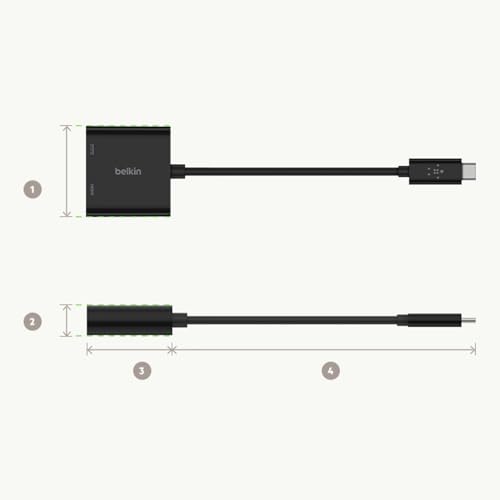
- Width: 43mm / 1.7â? , Height: 11.6mm / 0.45â? , Length without cable: 40mm / 1.57â? , Cable Length: 130mm / 5.1â?
- 0
- 0
- 0
,
Additional information
Specification: Belkin USB-C to HDMI Adapter + Charge (Supports 4K UHD Video, Pass-Through Power up to 60W for Connected Devices) HDMI Adapter- Black
|
Price History
-
Reviews (13)
13 reviews for Belkin USB-C to HDMI Adapter + Charge (Supports 4K UHD Video, Pass-Through Power up to 60W for Connected Devices) HDMI Adapter- Black
Show all
Most Helpful
Highest Rating
Lowest Rating



Phoenix –
Gets a touch uncomfortably warm when used for long, but is a handy adapter for those who need such an adapter.
Ur Goto Guy – Anil –
Quality product, does what it claims (power + ethernet in => usb ethernet with PD out). Plugged it to a (decent) USB power adapter gave error on the attached device (Chromecast HD with Google TV) even though the device worked fine off that power adapter before. It worked when I plugged it into a USB C power adapter rated for PD. My guess is that the device itself needs a good amount of power – so long as you have a PD power adapter you will be fine. Didn’t test the throughput as even 50Mbps (5% of the rated value) would be sufficient for streaming 4k.
Andrej Eftimov –
Happy with product
E. Arsenault Lowenthal –
El producto funciona bien, sin problemas.
Aunque creo que por un precio menor se pueden adquirir otros conectores con el mismo resultado.
Giridhar Belgaumkar –
Charging does not work as mentioned. Tried by replacing 2 times. All had same issues. Even if the charger is connected, mobile charge level went on discharging.
Mayank Hooda –
Oh what a scam this aftermarket cables world is. I fell into this rabbit hole when I wanted to get my MacBook hooked up to a 4k monitor.
Tried multiple cables and hubs, they all advertise displays upto 5k. But none of them support it at 60Hz, even the ones who blatantly advertise to do so! Amazon is so full of them, cheap Chinese knockoffs and what not.
Belkin was my last resort. I would have gone out and returned my Acer 4k monitor (costing 55k) if this wasn’t going to work. This quite simply would have been the last straw.
With heartfelt emotions I write this review (in full 60Hz 4k resolution), this adapter JUST WORKS 🙂
Buy it for your MacBook without a doubt!
Ur Goto Guy – Anil –
𝗦𝗮𝘁𝗶𝘀𝗳𝗶𝗲𝗱 𝗼𝗻𝗹𝘆 𝟱𝟬%.
My main reason for the purchase of the product is that the adapter will charge the phone while I’m using internet through lan cable. But that functionality is not working.
I’m using the adapter with Moto G34 5G which is basic smartphone with 5G network. As you can see in the pics I attached the LAN cable and Power cable (Power cable coming from adapter for charging smartphone) and LAN Cable is output to router. LAN Cable functionality is working as expected. But phone is not charging, I tried all options under USB but no luck, but but one blessing in disguise is that my phone is not discharging fast as how it used to happen without power output.
So, my final thoughts are if you are looking for an adapter which you think can charge the devices with power output of 60W as mentioned in product discription then this is not the device you want to go for, but if you charged your device and want to keep it powered for atleast 70% more time than the one without power then you can choose this device.
Build quality is Okayish and won’t get heated quickly.
Hope this review helped you, if so give it a “Like”.
Mark Fox –
I bought this to use for my Lenovo Yoga laptop to hook up with monitor. Opted to go with reputable brand like Belkin to make sure the ports to my computer don’t get ruined and the connection is stable. Worked straight out of the box. It looks nice, glossy black. I wish it felt a bit sturdier as the casing feels like cheap plastic.
Anne L. –
I use my Quest3 VR headset in a different room from my gaming PC & read a lot of articles about people buying dedicated routers to do AirLink streaming but I thought something like this would be better & I was (mostly) right!.
If you have ethernet in different rooms, this adapter makes it very easy to hook up your headset & stream in super high quality for hours. Depending on your home layout, you can even run your own ethernet cable from room to room (ethernet has a limit of approx. 300ft!).
The biggest catch I found was the USBC from the adapter to the headset. Long story short, the shorter the cable the better. I wasted a lot of time trying to figure out what was wrong with the software or PC when it was the USBC cable the whole time. I decided to velcro this adapter to the side of my headset & run 20ft USBC power & ethernet cables right up my back to the headset. Works like a charm with the highest resolution settings! I plan to use a cable sleeve to bundle the 2 cables together.
Using Virtual Desktop & my 3080TI, I am able to run 200 bitrate, godlike, & 120fps.
If you are doing this, you should set up a OpenSpeedTest server on your gaming PC to ensure you’re getting solid speeds. There can be a lot of unique variables in each person’s environment, but if you’re set up well, you should get over 900mbps speeds from the headset to your computer.
IMHO, this is the best option when it comes to VR streaming. It is certainly the most bang for your buck!
Aarón Sánchez –
Bought on recommendation of office supervisor. Works well when I have to work in the physical office once a week. Was tired of struggling to get multiple unfamiliar monitors connected to my laptop. This device allows for quick plug in and get on with the business of the day.
Dhineshkumar –
Initially I purchased ugreen usb hub which contains usb A, hdmi and memory card reader since i wanted memory card reader as well. It was of good quality but kind of heating a lot and battery drains from laptop faster. So i was looking for alternatives and decided to purchase HDMI adapter and card reader as a separate devices since memory card reader is occasionally required for my purpose, but HDMI requires all the time for my second monitor with dell full HD from Macbook M1 air. After I started using this i was very much satisfied. As per my testing, this adapter consumes 5 watts to operate which is good. Lets look into the pros and cons
Pros
1. No over heating compared to my previous hub (litte warm, but compared to ugreen aluminium body heat, its much much better)
2. Battery is not draining fast compared to my ugreen usb C hub
3. it has HDMI output as well as charging port. So no need to sacrifice another usb c port for charging in host devices
4. Works great with mac m1 and windows 11
5. No issues while mac awake from sleep which some users complained that other brand hubs are not recognised by mac when mac book wakes from sleep mode
6. Checked with 65 watts lenovo charger and 35 watts apple charger. It works good
Cons
1. Made of plastic. Could have been in aluminium which will look good as well as good heat dissipation
2. When charging port is used in the adapter along with HDMI port, monitor will reconnect while charger is switched off
3. Type C port in adapter can be used only for charging purpose, it will not support any other connectivity like connecting type c pendrive or another usb hub
4. I am not sure this type charging port on this adapter is pass through charging because when I connect the apple charger to this adapter macbook just charging but mac is not recognising it as apple charger or another brand charger but only recognise the charging wattage. Its not the case if I connect the charger directly on c port regardless of if its apple charger or lenovo type c charger. Mac os was able to detect as apple or lenovo charger and its wattage along with how much power it can give as output. If anybody’s wants the host device to recognise the charger type, i guess apple type multiport adapter is the only choice
I haven’t tested this adapter with 4k monitor. So not sure how much heat it will generate if it connected to 4k monitor
Shiva –
There is no lag, speed is good, product is compatible and compact at the same time. I’m using this for my Mac air and works flawless
Yellow Cab –
Charges macbook seamlessly
Hdmi works well
Top quality product
Don’t buy monitors with usb c cable as they are unnecessarily expensive. Buy a good monitor with hdmi cable and buy this product.