



Brother HL-L2351DW Monochrome Laser Printer with Auto Duplex & Wi-Fi Printing
₹16,299.00
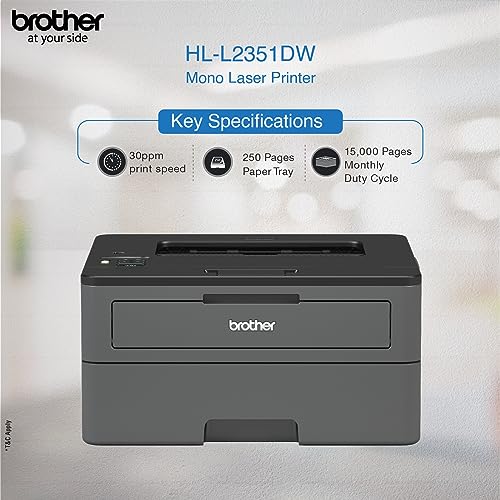
- Printer Type – Laser ; Functionality – Single Function (Print Only); Printer Output – Mono
- Compatible OS – Windows XP Home, Windows XP Professional, Windows XP Professional x64 Edition, Windows Vista, , Windows 7, Windows 8, Windows 8.1 & More
- Ideal Usage – Small Office Home Office, Duty Cycle – 15,000 pages a month
- For requesting installation of this product once delivered, please directly call Brother support on the toll free number and provide product’s model name as well as seller’s details mentioned on the purchase copy
- Genuine Toner Cartridges – TN-2465 (3000 pages), TN-2469 (4500 pages) : as per ISO standards
- Pages Per Minute – 30 ppm
,
Specification: Brother HL-L2351DW Monochrome Laser Printer with Auto Duplex & Wi-Fi Printing
|
8 reviews for Brother HL-L2351DW Monochrome Laser Printer with Auto Duplex & Wi-Fi Printing
Show all
Most Helpful
Highest Rating
Lowest Rating
Add a review
Related Products


Brother HL-L2351DW Monochrome Laser Printer with Auto Duplex & Wi-Fi Printing
₹16,299.00

MOHIT KUMAR –
Good product but toner cost high
alphavictor –
I had a Canon inkjet printer which I’d bought 6 years ago and had an ink tank installed. Turns out inkjet printer cartridges get clogged if you don’t use them frequently enough. So the savings from the ink tank against cartridges went back into buying new cartridges. Time for a laser printer, then.
Zeroed in on this Brother laser printer now after reading several reviews and watching several youtube videos. Waited a few days to get a good price as the price kept fluctuating every 2 days. Finally bought it for 10,499 – a very good deal, I believe.
Been using it for a month and a half and so far, extremely happy with the performance and print quality. Prints are sharp and quick. No smudging, no streaking.
Adding it to a new PC is extremely easy. Switch it on and let Windows search for it in “Add a printer” settings. Pairs within seconds. No drivers needed to be installed.
Printing wirelessly via the phone app is a bit slow. Printing from a PC is fast though. Haven’t measured the print per minute since I need to take 4-5 prints at a time.
The wireless & auto-duplex functions were the main attraction for me. I thought about buying one with a scanner, but Microsoft Lens app is a good enough document scanner now.
Overall, this printer gets a 5* rating from me.
Stamewo –
One of the worst printers ever made. Dont know why i bought it. Too expensive and broken three times in one year. Customer care doesnt respond and i am fed up with this one.
VIVEK SINGH –
This is the most easy printer to install. It took me hardly 4 mins to install and use it. I had a bad moment when I was trying to put the toner wrong side in, but apart from that it was easy.
Stamewo –
It’s been 4 month, printer is good. We bought it for home. I print 30-40 pages per week. Didn’t get any issue.
Vikram –
I was looking to replace my existing hp printer as I wanted a new one with wifi. After a lot of research I zeroed I’m on this beautiful product based on price and quality. No other printer is available at this price with wifi and duplex printing. I just set it up. When I read the reviews it said that the set up was complicated, but all that u need to do is follow the prompts and then it’s a breeze. After a one time set up, u are on a roll. Printing from the phone is a breeze and it just made my life so simple. Thank u amazon and Brother for such a lovely product.
Rijesh P. –
I purchased this item for home use. I was using HP Desk jet All in One printer and fed up with refilling and changing its cartridge, where it was dry out quickly ; realized it was a wrong item purchased. I gave that item to someone who can manage its cartridge better. This time I was looking for just a printer (no color, no all in one) with wifi support (As I wanted to make sure that I can connect from mobile devices) with auto duplex support and least operating cost. My search ended in monochrome laser printer (black and white) and then picked up Brother brand. I got this printer with discount, so its value for money.
Advantages I can see –
– Cartridges easily available, cost is less than 2000 and can print upto 3000 pages. This is far better than HP printers in cost wise.
– Paper tray will hold paper inside, there is no need to open and put paper for print and its completely closed.
– Very nice printout, no sound while printing and very fast.
– I can print from Laptop and Mobile.
Its Wifi setup was difficult, it took about three hours for me to complete the setup. The reason, the CD that came with this printer wasn’t reading, hence I had to download its drivers. Plus wifi setup was bit tricky. After doing initial setup from Laptop print from mobile wasn’t coming.
Here is the tip, once you have Brand new printer, you can contact Brother support, they will provide installation and demo free of cost. I called Brother support, the support person visited my place and addressed the issue quickly. Print from mobile too work.
I’ve also compared HP laser jetss, they have world’s smallest laser printer, but that doesn’t support auto duplex (double side printing). That’s small, but then there is no covered paper tray, hence you will have to open and manage paper overtime you want prints. None of the laser printers in this price range from HP or Canon supports auto duplex mode.
Overall a very good product. If you feel you choose a laser printer with full duplex support; this is the best one low cost. All other laser printer cost higher.
Michael –
I just needed an entry level printer
Brother has been good
Decent duty load for some office printing and some invoices.
No issues yet. Refilling is standard, change cartridge every 3-4 times
Print quality for text is as good as it gets I guess . Nothing to write home about nor complain about